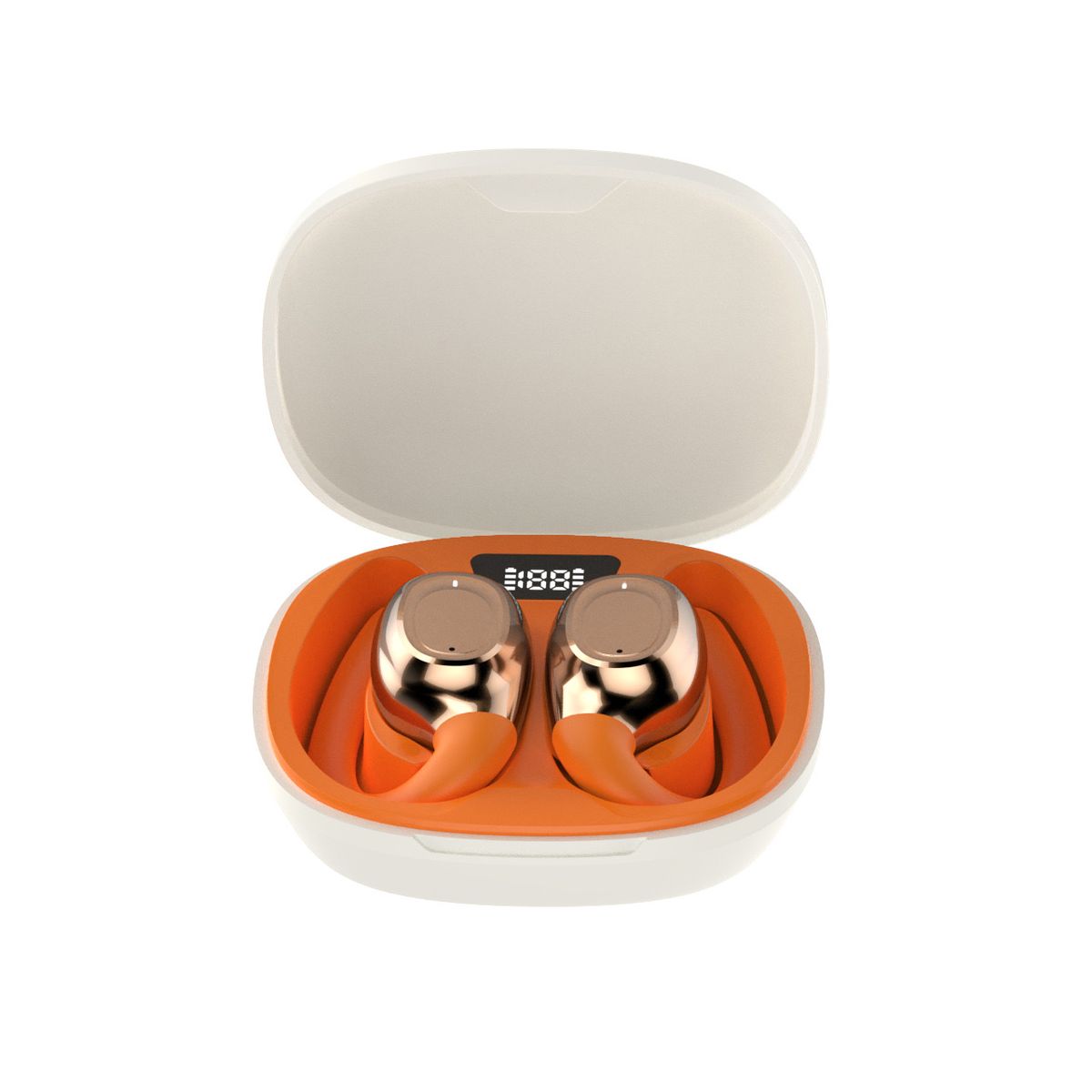
IKUN X3 Wireless Over Ear Earbuds Charging Box Water Resistancd Sport Music

IKUN X3 Wireless Over Ear Earbuds Charging Box Water Resistancd Sport Music

Brand: Ikun
Ikun x3
4.03 Reviews
FromR 26.16
⚠️ ACTION REQUIRED
Please select a product variation (size, color, etc.) to view the actual price

Ikun x3

🛡️
Warranty
6-Month Limited Warranty.
↩️
Return Policy
Hassle-Free Exchanges & Returns for 7 Days.

Select Colour

Product Information

SKU95255470
Stock StatusIn Stock
Safe Checkout

These wireless earphones are catchy and comfortable and bring you the bliss combination of good quality and flexibility.
They feature Bluetooth 5.0, meaning a larger range (about 10m) and faster communication speeds.
The earbuds can be used separately or together (note, they will both still be connected to the same mobile device when used separately).
Tap control allows you to adjust volume, skip to the next song and perform various other control functions by simply tapping on one of the earpods.
They are compatible with Android, iOS and most Bluetooth-enabled mobile devices.
Upon insertion into charging case, charging of earbuds commences automatically.

You only have to remember to charge the charging case from time to time with the charging cable - quick, easy, no hassle, no fuss.
Charging time: 1-2 hours
Standby Time: 20-30 hours
Working Time: 2-3 hours

User instructions:
Please note that the 'buttons' on the pods are really just touched sensitive areas that are located around the same place as the lights in the ear pods - pretty much the uppermost part of the pod that you can touch while the inpods are inserted in your ears.

Note:
Do not charge your headset for much longer than 2.5 hours at a time, because this can lead to a reduction in battery capacity and can void your manufacturer's warranty.

To properly wear the earbuds:
Identify the Left and Right - Look on the earbud for an R or L.
Place the earphone with the earbud in your ear canal and rotate forward until comfortable.

Troubleshooting
Why are the headphones not charging?
Please make sure both ends of the USB cable are securely connected. If you use a power outlet, ensure that the power supply is connected securely and the outlet works. If you use a computer, make sure it is connected and the USB port is powered. Try to turn on the headset and then turn them off. Disconnect and reconnect the USB charging cable.
Why are the headphones not pairing with the mobile device?
Please check whether your headphone is in pairing mode or reconnect mode and check whether your mobile phone Bluetooth search function is opened and active;
Check your mobile device's Bluetooth menu and delete/forget the headphones, then reconnect the headphones following the instructions in the user manual.
Why do the earphones disconnect with the mobile phone within 10 meters?
Please check if there is metal or any other material within a relatively close range that may interfere with the Bluetooth connection. Bluetooth is a radio technology that is sensitive to objects positioned between the headphone and the connected device.

There is no audio signal, what can I do?
Check if the headphones are turned on and paired. If necessary, switch on or pair the headphones with the audio source again. Check the connection of your audio source. If the volume is too low, turn up the volume.

Why can't I use the headphones to adjust the volume or select the track on the App of my mobile phone?
App Software settings may vary according to some functions of the App itself not depending on the pods.

What's in the box
1 x Pair of IKUN X3 Wireless over ear earbuds
1 x Charging box
1 x Charging cable
1 x User Manual

These wireless earphones are catchy and comfortable and bring you the bliss combination of good quality and flexibility.
They feature Bluetooth 5.0, meaning a larger range (about 10m) and faster communication speeds.
The earbuds can be used separately or together (note, they will both still be connected to the same mobile device when used separately).
Tap control allows you to adjust volume, skip to the next song and perform various other control functions by simply tapping on one of the earpods.
They are compatible with Android, iOS and most Bluetooth-enabled mobile devices.
Upon insertion into charging case, charging of earbuds commences automatically.

You only have to remember to charge the charging case from time to time with the charging cable - quick, easy, no hassle, no fuss.
Charging time: 1-2 hours
Standby Time: 20-30 hours
Working Time: 2-3 hours

User instructions:
Please note that the 'buttons' on the pods are really just touched sensitive areas that are located around the same place as the lights in the ear pods - pretty much the uppermost part of the pod that you can touch while the inpods are inserted in your ears.

Note:
Do not charge your headset for much longer than 2.5 hours at a time, because this can lead to a reduction in battery capacity and can void your manufacturer's warranty.

To properly wear the earbuds:
Identify the Left and Right - Look on the earbud for an R or L.
Place the earphone with the earbud in your ear canal and rotate forward until comfortable.

Troubleshooting
Why are the headphones not charging?
Please make sure both ends of the USB cable are securely connected. If you use a power outlet, ensure that the power supply is connected securely and the outlet works. If you use a computer, make sure it is connected and the USB port is powered. Try to turn on the headset and then turn them off. Disconnect and reconnect the USB charging cable.
Why are the headphones not pairing with the mobile device?
Please check whether your headphone is in pairing mode or reconnect mode and check whether your mobile phone Bluetooth search function is opened and active;
Check your mobile device's Bluetooth menu and delete/forget the headphones, then reconnect the headphones following the instructions in the user manual.
Why do the earphones disconnect with the mobile phone within 10 meters?
Please check if there is metal or any other material within a relatively close range that may interfere with the Bluetooth connection. Bluetooth is a radio technology that is sensitive to objects positioned between the headphone and the connected device.

There is no audio signal, what can I do?
Check if the headphones are turned on and paired. If necessary, switch on or pair the headphones with the audio source again. Check the connection of your audio source. If the volume is too low, turn up the volume.

Why can't I use the headphones to adjust the volume or select the track on the App of my mobile phone?
App Software settings may vary according to some functions of the App itself not depending on the pods.

What's in the box
1 x Pair of IKUN X3 Wireless over ear earbuds
1 x Charging box
1 x Charging cable
1 x User Manual

More in Standard Headphones