SALE
Mono Printer WiFi All-in-One Ink Tank + A4 Paper | Epson M2120

Mono Printer WiFi All-in-One Ink Tank + A4 Paper | Epson M2120

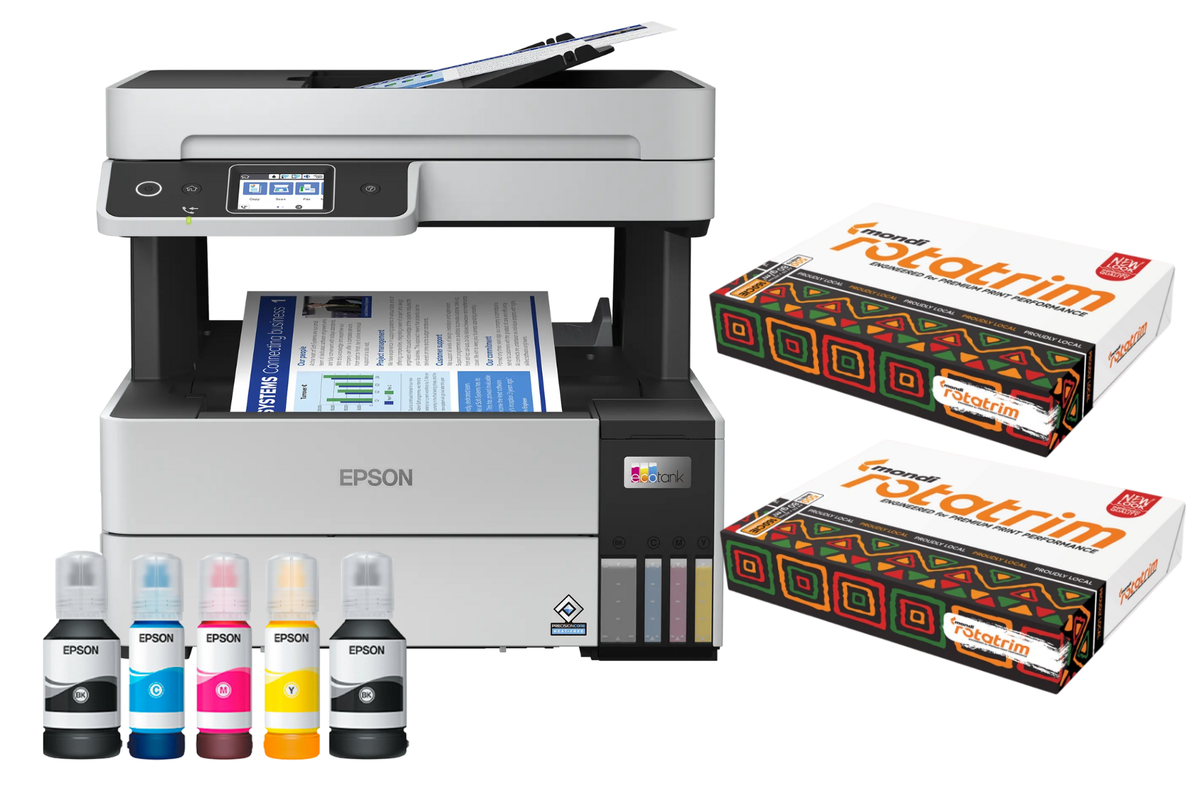
EcoTank M2120 Black-Only Print, Copy & Scan Bundle with 2500 Sheets Rotatrim A4 Office Paper
No reviews yet
R 424.00R 437.41
🚚 Ships in 7-9 work days

EcoTank M2120 Black-Only Print, Copy & Scan Bundle with 2500 Sheets Rotatrim A4 Office Paper

🛡️
Warranty
6-Month Limited Warranty.
↩️
Return Policy
Hassle-Free Exchanges & Returns for 7 Days.

Product Information

SKU103346921
Stock StatusIn Stock
Safe Checkout

Buy Now, Pay Later

Split your purchase into easy payments

Interest Rate0% Interest
Payment Period3 months
Sale Product - Fixed Term
  • 30% deposit then pay monthly - that's only R 127.20 upfront!
  • No interest - you only pay the product price
  • Quick approval - decision within 1-2 business days
  • Secure - ID verification required for your protection

Epson EcoTank M2120 Mono All-in-One Wi-Fi Printer + 5 Reams Mondi Rotatrim A4 Paper - Thousands of Pages, Straight Out the Box

Built for people who print a lot of documents and do not need colour. The Epson EcoTank M2120 prints, copies and scans in black and white at low cost per page, and this bundle adds a full box of Mondi Rotatrim A4 paper. That is 2,500 sheets and thousands of pages of ink in a single delivery.

Please Note: This is a monochrome printer. It prints in black and white only. If you need colour printing, choose one of our colour EcoTank models instead.

Why It Costs So Little to Run

Laser printers look cheap until the toner runs out. The EcoTank M2120 works differently. A large refillable ink tank tops up from bottles, and one bottle of EcoTank ink is the equivalent of five toner cartridges. That is a saving of up to 90 percent on printing costs.

The bottle included in the box prints up to 5,000 pages, so you can print thousands of documents before buying ink for the first time. Paired with the 2,500 sheets in this bundle, you are set for a long stretch of everyday printing.

Print, Copy and Scan in One Machine

  • Print - Clean, sharp black text using Epson's Micro Piezo print head and pigment ink, at 1,440 x 720 dpi. Ideal for invoices, contracts, forms, reports and study notes.
  • Copy - Make copies directly on the machine, no computer needed.
  • Scan - A 1,200 x 2,400 dpi flatbed scanner captures documents and photos, saving them as PDF, JPEG, PNG, TIFF, BMP and more.

Fast, With No Warm-Up Wait

Print speeds reach 15 pages per minute under ISO testing and up to 32 pages per minute at maximum speed, with the first page out in around 8 seconds. Unlike a laser printer, there is no warm-up time, so the machine starts printing the moment you send a job.

The 150-sheet paper tray holds more than most printers in this class, which means fewer interruptions on long print runs.

Print from Almost Anywhere

Connect over Wi-Fi and print without a cable. Wi-Fi Direct lets you print straight from a phone or tablet even without a router, and the Epson iPrint app plus Epson Connect let you send documents to the printer from almost any location. Apple AirPrint works out the box. The 3.7cm colour panel keeps everyday tasks simple.

Pigment Ink That Holds Up

The M2120 uses pigment ink rather than dye. Pigment sits on the surface of the page and resists water and smudging far better, which matters for documents that get signed, filed, posted or handled. Text stays crisp and dark rather than fading or bleeding.

Simple to Set Up, Compact to Live With

The ink tank system is fully integrated and designed to be filled without mess. The printer is compact enough to fit a home office desk or a shelf without dominating the space.

Plus a Full Box of Mondi Rotatrim A4 Paper

Rotatrim is the paper most South African offices already run on. At 80gsm with high whiteness and high opacity, text comes out sharp and print does not show through from the reverse. Its smooth, uncoated surface feeds reliably through inkjets, lasers and copiers alike, which means fewer jams and consistent results sheet after sheet.

The box holds 5 reams of 500 sheets each, so 2,500 sheets in total. For a home or small office that is months of printing bought in one go, at bundle price, instead of a trip to the shops every few weeks.

Trusted Worldwide

Epson has sold over 50 million EcoTank printers since 2010, making it the number one ink tank printer brand in the world. In the Middle East and Africa, 7 out of 10 ink tank printers sold are Epson.

Printer Specifications:

  • Model: Epson EcoTank M2120
  • Type: Monochrome (black and white only)
  • Functions: Print, copy, scan
  • Print Technology: Epson Micro Piezo print head, pigment ink
  • Print Resolution: 1,440 x 720 dpi
  • Minimum Droplet Size: 3 picolitres
  • Nozzle Configuration: 180 nozzles black
  • Print Speed: 15 ppm mono (ISO); up to 32 ppm maximum
  • First Page Out: 8 seconds
  • Included Ink Yield: Up to 5,000 pages
  • Ink Bottle Compatibility: Epson 110S
  • Scan Resolution: 1,200 x 2,400 dpi flatbed, CIS sensor
  • Scan Formats: PDF, JPEG, PNG, TIFF, multi-TIFF, BMP, PICT
  • Paper Tray: 150 sheets, output tray 30 sheets
  • Paper Sizes: A4, Legal
  • Display: 3.7cm colour panel
  • Connectivity: Wi-Fi, Wi-Fi Direct
  • Mobile Printing: Epson iPrint, Epson Connect, Apple AirPrint
  • Operating Systems: Windows XP to 10, Windows Server, macOS 10.6.8 and later
  • Energy Use: 15W copying, 4.3W ready, 0.7W sleep, 0.2W off
  • Warranty: 1 year or 100,000 pages

Paper Specifications:

  • Brand: Mondi Rotatrim
  • Size: A4 (210 x 297mm)
  • Weight: 80 g/m2
  • Colour: White, uncoated
  • Quantity: 1 box, 5 reams of 500 sheets (2,500 sheets)
  • Box Weight: 12.5kg
  • Suitable for: Inkjet printers, laser printers, copiers

Care and Maintenance:

  • Keep the printer flat and level. Never tilt or move it once the tank is filled, as ink can leak.
  • Print at least a page every week or two. Inkjet nozzles clog when left unused for long stretches.
  • Refill the tank before it runs completely dry. Running the printer empty can damage the print head.
  • Use only genuine Epson 110S ink bottles. Third-party ink voids the warranty and often causes clogging.
  • Store paper flat in its wrapper, somewhere dry and out of direct sunlight. Damp paper curls and jams.
  • Fan a stack of paper before loading to separate the sheets and reduce misfeeds.
  • Clean the scanner glass with a soft, dry, lint-free cloth. Never use solvents or abrasive cleaners.

Order the Epson EcoTank M2120 and Mondi Rotatrim bundle today. A workhorse mono printer that costs a fraction to run, thousands of pages of ink, and a full box of paper to go with it.

What's in the box
1 x Epson EcoTank M2120 Mono All-in-One Printer
1 x Epson 110S Black Ink Bottle
1 x Mondi Rotatrim A4 White Copy Paper Box (5 reams, 2,500 sheets)
1 x Power Cable
1 x Setup Guide
1 x Warranty Documentation

Epson EcoTank M2120 Mono All-in-One Wi-Fi Printer + 5 Reams Mondi Rotatrim A4 Paper - Thousands of Pages, Straight Out the Box

Built for people who print a lot of documents and do not need colour. The Epson EcoTank M2120 prints, copies and scans in black and white at low cost per page, and this bundle adds a full box of Mondi Rotatrim A4 paper. That is 2,500 sheets and thousands of pages of ink in a single delivery.

Please Note: This is a monochrome printer. It prints in black and white only. If you need colour printing, choose one of our colour EcoTank models instead.

Why It Costs So Little to Run

Laser printers look cheap until the toner runs out. The EcoTank M2120 works differently. A large refillable ink tank tops up from bottles, and one bottle of EcoTank ink is the equivalent of five toner cartridges. That is a saving of up to 90 percent on printing costs.

The bottle included in the box prints up to 5,000 pages, so you can print thousands of documents before buying ink for the first time. Paired with the 2,500 sheets in this bundle, you are set for a long stretch of everyday printing.

Print, Copy and Scan in One Machine

  • Print - Clean, sharp black text using Epson's Micro Piezo print head and pigment ink, at 1,440 x 720 dpi. Ideal for invoices, contracts, forms, reports and study notes.
  • Copy - Make copies directly on the machine, no computer needed.
  • Scan - A 1,200 x 2,400 dpi flatbed scanner captures documents and photos, saving them as PDF, JPEG, PNG, TIFF, BMP and more.

Fast, With No Warm-Up Wait

Print speeds reach 15 pages per minute under ISO testing and up to 32 pages per minute at maximum speed, with the first page out in around 8 seconds. Unlike a laser printer, there is no warm-up time, so the machine starts printing the moment you send a job.

The 150-sheet paper tray holds more than most printers in this class, which means fewer interruptions on long print runs.

Print from Almost Anywhere

Connect over Wi-Fi and print without a cable. Wi-Fi Direct lets you print straight from a phone or tablet even without a router, and the Epson iPrint app plus Epson Connect let you send documents to the printer from almost any location. Apple AirPrint works out the box. The 3.7cm colour panel keeps everyday tasks simple.

Pigment Ink That Holds Up

The M2120 uses pigment ink rather than dye. Pigment sits on the surface of the page and resists water and smudging far better, which matters for documents that get signed, filed, posted or handled. Text stays crisp and dark rather than fading or bleeding.

Simple to Set Up, Compact to Live With

The ink tank system is fully integrated and designed to be filled without mess. The printer is compact enough to fit a home office desk or a shelf without dominating the space.

Plus a Full Box of Mondi Rotatrim A4 Paper

Rotatrim is the paper most South African offices already run on. At 80gsm with high whiteness and high opacity, text comes out sharp and print does not show through from the reverse. Its smooth, uncoated surface feeds reliably through inkjets, lasers and copiers alike, which means fewer jams and consistent results sheet after sheet.

The box holds 5 reams of 500 sheets each, so 2,500 sheets in total. For a home or small office that is months of printing bought in one go, at bundle price, instead of a trip to the shops every few weeks.

Trusted Worldwide

Epson has sold over 50 million EcoTank printers since 2010, making it the number one ink tank printer brand in the world. In the Middle East and Africa, 7 out of 10 ink tank printers sold are Epson.

Printer Specifications:

  • Model: Epson EcoTank M2120
  • Type: Monochrome (black and white only)
  • Functions: Print, copy, scan
  • Print Technology: Epson Micro Piezo print head, pigment ink
  • Print Resolution: 1,440 x 720 dpi
  • Minimum Droplet Size: 3 picolitres
  • Nozzle Configuration: 180 nozzles black
  • Print Speed: 15 ppm mono (ISO); up to 32 ppm maximum
  • First Page Out: 8 seconds
  • Included Ink Yield: Up to 5,000 pages
  • Ink Bottle Compatibility: Epson 110S
  • Scan Resolution: 1,200 x 2,400 dpi flatbed, CIS sensor
  • Scan Formats: PDF, JPEG, PNG, TIFF, multi-TIFF, BMP, PICT
  • Paper Tray: 150 sheets, output tray 30 sheets
  • Paper Sizes: A4, Legal
  • Display: 3.7cm colour panel
  • Connectivity: Wi-Fi, Wi-Fi Direct
  • Mobile Printing: Epson iPrint, Epson Connect, Apple AirPrint
  • Operating Systems: Windows XP to 10, Windows Server, macOS 10.6.8 and later
  • Energy Use: 15W copying, 4.3W ready, 0.7W sleep, 0.2W off
  • Warranty: 1 year or 100,000 pages

Paper Specifications:

  • Brand: Mondi Rotatrim
  • Size: A4 (210 x 297mm)
  • Weight: 80 g/m2
  • Colour: White, uncoated
  • Quantity: 1 box, 5 reams of 500 sheets (2,500 sheets)
  • Box Weight: 12.5kg
  • Suitable for: Inkjet printers, laser printers, copiers

Care and Maintenance:

  • Keep the printer flat and level. Never tilt or move it once the tank is filled, as ink can leak.
  • Print at least a page every week or two. Inkjet nozzles clog when left unused for long stretches.
  • Refill the tank before it runs completely dry. Running the printer empty can damage the print head.
  • Use only genuine Epson 110S ink bottles. Third-party ink voids the warranty and often causes clogging.
  • Store paper flat in its wrapper, somewhere dry and out of direct sunlight. Damp paper curls and jams.
  • Fan a stack of paper before loading to separate the sheets and reduce misfeeds.
  • Clean the scanner glass with a soft, dry, lint-free cloth. Never use solvents or abrasive cleaners.

Order the Epson EcoTank M2120 and Mondi Rotatrim bundle today. A workhorse mono printer that costs a fraction to run, thousands of pages of ink, and a full box of paper to go with it.

What's in the box
1 x Epson EcoTank M2120 Mono All-in-One Printer
1 x Epson 110S Black Ink Bottle
1 x Mondi Rotatrim A4 White Copy Paper Box (5 reams, 2,500 sheets)
1 x Power Cable
1 x Setup Guide
1 x Warranty Documentation