Poe 430p Mini D.C UPs for WiFi Routers

Poe 430p Mini D.C UPs for WiFi Routers

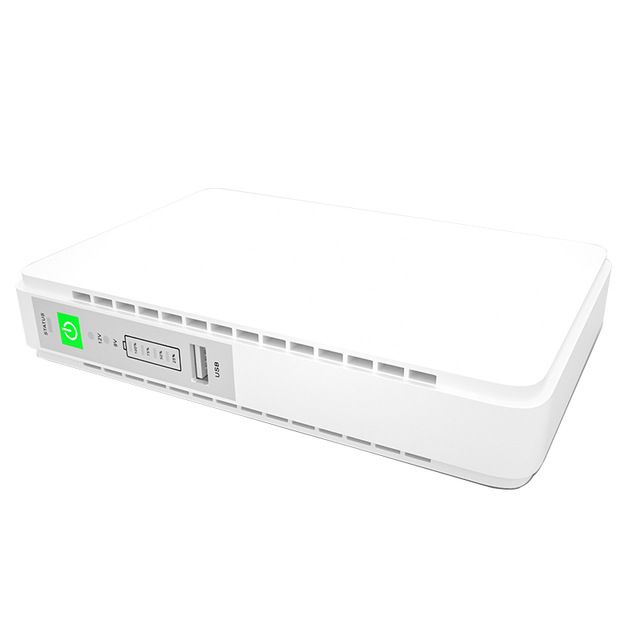
Built-in lithium battery Microprocessor controller guarantees high reliability Auto start when plugged in Manual power o…
5.05 Reviews
R 51.24
🚚 Ships in 5-7 work days

Built-in lithium battery Microprocessor controller guarantees high reliability Auto start when plugged in Manual power off switch Overload short circuit protection Over-charge and over-discharge prote...

🛡️
Warranty
6-Month Limited Warranty.
↩️
Return Policy
Hassle-Free Exchanges & Returns for 7 Days.

Product Information

SKU93004579
Stock StatusIn Stock
Safe Checkout

Built-in lithium battery
Microprocessor controller guarantees high reliability
Auto start when plugged in
Manual power off switch
Overload short circuit protection
Over-charge and over-discharge protection
User's friendly multi-LED status indicators
Allows to set output voltage-9/12 VDC via switch
5V USB/DC output
Compatible for Router, Modem, CCTV, Cameras, Smart devices

Before connecting the devices to the UPS, you must check the nominal working voltage, current and polarity of the load, then adjust the voltage of the UPS to the
corresponding load voltage, confirm that the corresponding port is correct then connect to the load to prevent the machine from being burned out by connecting the
wrong voltage.

Each output terminal of this model has independent output power protection and short-circuit protection, and has a generals power protection mechanism. The power
of the load connected to all ports cannot exceed the defaulted output power. Otherwise, the corresponding port will turn off. When the total power setting is
exceeded, the 4 power indicator lights will flash at the same time and all output ports will turn off. Please remove the overloaded load. The UPS will restart every 5 seconds.
UPS work continuously when the load within overload protection range. Press and hold the power button for 2-3 seconds to start the UPS. Plug and play USB provides stable power supply for digital products.

After plugging in the AC mains supply, the status indicator turns green, it means AC mode. During the charging process, the power indicator will indicate the battery
capacity with 25%, 50%, 75% and 100% power respectively. After disconnecting the grid, the battery backup status indicator will turn red, and the power indicator will turn
off from 100%, 75%, 50% to 25%. When the 25% indicator flashes, it means the battery power is very low, and the UPS will stop output at any time.

What's in the box
1 x Poe 430p Mini d.c Ups
1 x Splitter Cable
1 x Warranty Card
1 x User Manual
1 x Power Cable

Built-in lithium battery
Microprocessor controller guarantees high reliability
Auto start when plugged in
Manual power off switch
Overload short circuit protection
Over-charge and over-discharge protection
User's friendly multi-LED status indicators
Allows to set output voltage-9/12 VDC via switch
5V USB/DC output
Compatible for Router, Modem, CCTV, Cameras, Smart devices

Before connecting the devices to the UPS, you must check the nominal working voltage, current and polarity of the load, then adjust the voltage of the UPS to the
corresponding load voltage, confirm that the corresponding port is correct then connect to the load to prevent the machine from being burned out by connecting the
wrong voltage.

Each output terminal of this model has independent output power protection and short-circuit protection, and has a generals power protection mechanism. The power
of the load connected to all ports cannot exceed the defaulted output power. Otherwise, the corresponding port will turn off. When the total power setting is
exceeded, the 4 power indicator lights will flash at the same time and all output ports will turn off. Please remove the overloaded load. The UPS will restart every 5 seconds.
UPS work continuously when the load within overload protection range. Press and hold the power button for 2-3 seconds to start the UPS. Plug and play USB provides stable power supply for digital products.

After plugging in the AC mains supply, the status indicator turns green, it means AC mode. During the charging process, the power indicator will indicate the battery
capacity with 25%, 50%, 75% and 100% power respectively. After disconnecting the grid, the battery backup status indicator will turn red, and the power indicator will turn
off from 100%, 75%, 50% to 25%. When the 25% indicator flashes, it means the battery power is very low, and the UPS will stop output at any time.

What's in the box
1 x Poe 430p Mini d.c Ups
1 x Splitter Cable
1 x Warranty Card
1 x User Manual
1 x Power Cable

More in Uninterrupted Power Supply (UPS)